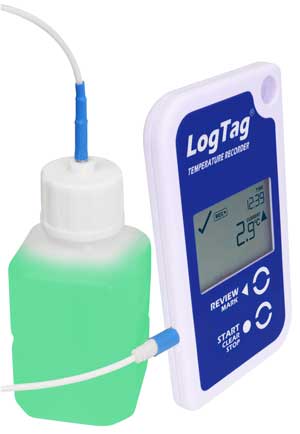
| Product Model | TRED30-16R (Replaceable Battery) |
| External Sensor Measurement Range | -40°C to +99°C (-40°F to +210°F). |
| Operating Temperature Range | -30°C to +60°C (-22°F to +140°F). |
| Storage Temperature Range | -10°C to +40°C (14°F to +104°F). |
| Rated Temperature Reading Accuracy | Better than ±0.5°C (±0.9°F) for -20°C to +40°C (-4°F to +104°F), typically ±0.3°C (0.6°F). Better than ±0.8°C (±1.4°F) for -40°C to -20°C (-40°F to -4°F), typically ±0.5°C (0.9°F). Better than ±0.8°C (±1.4°F) for +40°C to +70°C (+104°F to +158°F), typically ±0.7°C (1.3°F). Better than ±1.2°C (±2.2°F) for +70°C to +99°C (+158°F to +210°F), typically ±1°C (1.8°F). Actual performance is typically much better than the rated values. Please see the Rated Absolute Accuracy chart below. Accuracy figures can be improved by recalibration. |
| Rated Temperature Reading Resolution | 0.1°C (0.2°F) for measurements -40°C to +50°C (-40°F to +122°F). 0.2°C (0.4°F) for measurements +50°C to +70°C (+122°F to +158°F). 0.3°C (0.5°F) for measurements +70°C to +80°C (+158°F to +176°F). 0.4°C-0.6°C (0.7°F to 1°F) for measurements +80°C to +99°C (+176°F to +210°F). Please see the Rated Native Resolution chart below. LogTag Analyzer® currently displays to one decimal place of °C or °F. The native resolution is what is stored in the LogTag®. |
| Sensor Reaction Time | Typically less than 2 minutes (T90) in moving air (1m/s) for ST100T, ST100H and ST100S types. |
| Recording Capacity | 15,905 temperature readings. 66 days @ 6min logging. Day summary statistics memory (for display on LCD): up for 30 days of Max/Min/duration and alarm trigger statistics. |
| Sampling Interval | Configurable from 30 seconds to hourly. |
| Logging Start Options | Push button start or specific date & time. Optional start delay of up to 18 hours. |
| Recording Indication | State indicator “RECORDING”. |
| Download Time | Typically less than 10 seconds for full memory (15,905 readings), depending on computer or readout device used. |
| Environmental | IP61 (when vertically mounted or hung). |
| Power Source | 3V CR2032 (LiMnO2) coin cell battery, user replaceable. |
| Battery Life | Typically 1 year of operation. NOTE: Typical battery life assumes 6 minute logging, day statistics are reviewed on the display no more than once daily for no longer than 30 seconds each time. Download data monthly. NOTE: Continual activation of the audible alarm will reduce the working life of the battery. When an alarm is triggered, the alarm should be cleared and reset as soon as possible. |
| Real Time Clock | Built-in real time clock. Rated accuracy ±25ppm @ 25°C (equivalent to 2.5 seconds/day). Rated temperature coefficient is -0.034 ±0.006ppm/°C (I.e typically +/- 0.00294 seconds/day/°C). |
| Standard Remote Sensor Cable Length | Standard: 1.5m (4’11″). Extended: 3m (9’10″) (Recommended maximum). |
| Remote Sensor Cable Type | PTFE (FDA food contact rated), coaxial. |
| Size | 93mm(H) x 54.5mm(W) x 8.6mm(T). |
| Weight | 41g. |
| Case Material | Polycarbonate. |
| Compliance and Certifications |     |
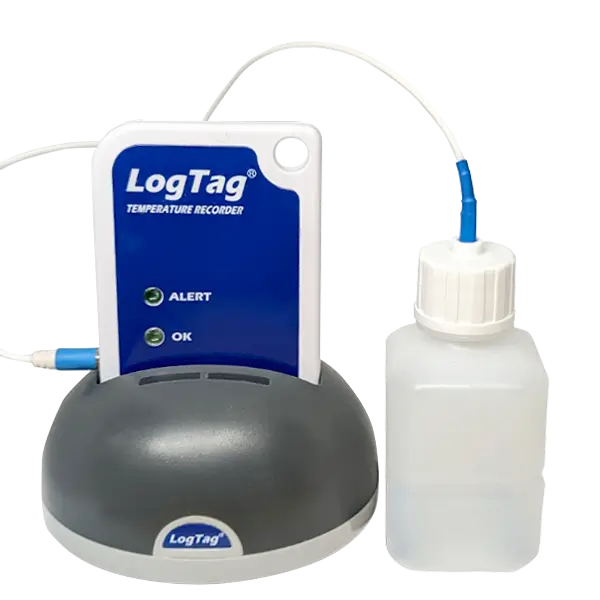
| Product Model | TREX-8 |
| External Sensor Measurement Range | -40°C to +99°C (-40°F to +210°F) |
| Operating Temperature Range | -40°C to +85°C (-40°F to +185°F). |
| Storage Temperature Range | -10°C to +55°C (14°F to +131°F). |
| Rated Temperature Reading Accuracy | Better than ±0.5°C for -10°C to +40°C. Better than ±0.7°C for -10°C to -30°C and +40°C to +60°C. Better than ±0.8°C for -30°C to -40°C and +60°C to +80°C. Better than ±1.0°C for +80°C to +99°C. Actual performance is typically much better than the rated values. Please see the Rated Absolute Accuracy chart below. Accuracy figures can be improved by recalibration. |
| Rated Temperature Reading Resolution | Less than 0.1°C for -40°C to +40°C. Less than 0.2°C for +40°C to +80°C. Less than 0.6°C for +80°C to +99°C. Please see the Rated Native Resolution chart below. LogTag Analyzer® currently displays to one decimal place of °C or °F. The native resolution is what is stored in the LogTag®. |
| Sensor Reaction Time | Typically less than 2 minutes (T90) in moving air (1m/s) for ST100T, ST100H and ST100S types. |
| Recording Capacity | 8031 temperature readings. 53 days @ 10min logging, 80 days @ 15min logging. |
| Sampling Interval | Configurable from 30 seconds to several hours. |
| Logging Start Options | Push button start or specific date & time. Optional start delay of up to 18 hours. |
| Recording Indication | Flashing ‘OK’ indicator / flashing ‘ALERT’ indicator. |
| Download Time | Typically less than 5 seconds for full memory (8031 readings), depending on computer or readout device used. |
| Environmental | IP61. |
| Power Source | 3V Li-Mg Battery. |
| Battery Life | 2 – 3 years of normal use (based on 15 minute logging, download data monthly). |
| Real Time Clock | Built-in real time clock. Rated accuracy ±25ppm @ 25°C (equivalent to 2.5 seconds/day). Rated temperature coefficient is -0.034 ±0.006ppm/°C (I.e typically +/- 0.00294 seconds/day/°C). |
| Standard Remote Sensor Cable Length | Standard: 1.5m (4’11″). Extended: 3m (9’10″) (Recommended maximum). |
| Remote Sensor Cable Type | PTFE (FDA food contact rated), coaxial. |
| Size | 86mm(H) x 54.5mm(W) x 8.6mm(T). |
| Weight | 36g (without External Probe). |
| Case Material | Polycarbonate. |
| Compliance and Certifications |
|